
How do I set a minimum run duration for certain days of the week?
By Dr. Sean Radford
•
25th July 2022
(Updated 16th April 2023)
This can be done from your Training Settings, where you will find that for each day of the week, there is a minimum run duration field.
- Go to your Training Settings by clicking on the Settings menu ① and then Training Settings menu item ②.
- Click ‘Update training settings’ ③.
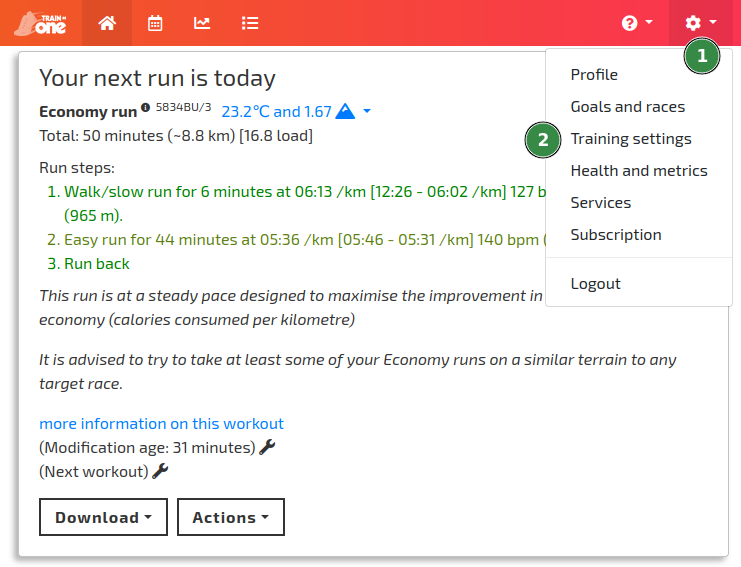
Accessing your Training Settings from the TrainAsONE Settings menu.
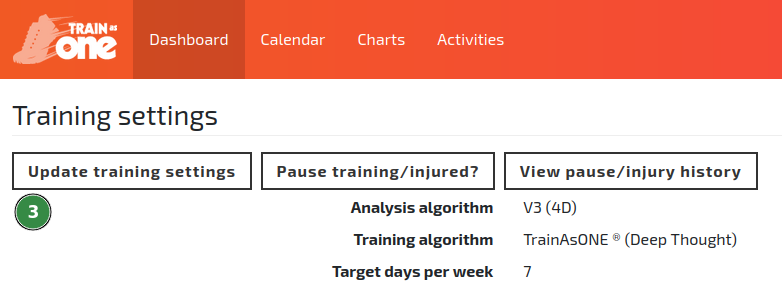
The Update Training Settings button.
- In the ‘Days of the week’ section, enter values in the ‘Min. Run Dur.’ column ④ and click 'Save' ⑤.
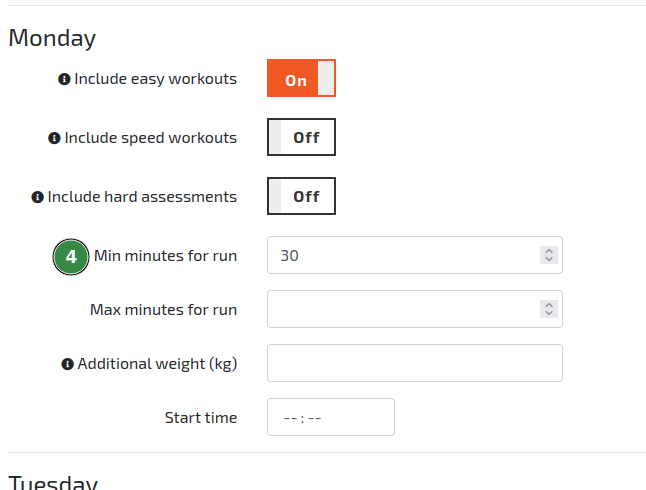
Specifying a 30 minute run duration for Monday within the TrainAsONE Training Settings.
Please note that in some situations where a planned workout has complex speed steps (e.g. a 6 minute assessment), the plan construction may result in a workout that is slightly shorter than the minimum duration. We have a fix for this on our development roadmap.