
I've done an off-plan run but still want to do my normal number of scheduled workouts for the week. What do I do?
By Dr. Sean Radford
•
27th February 2022
(Updated 21st May 2026)
Completed a sneaky off-plan run, but don't want it to count towards your normal number of workouts for the week? No problem, you can mark the run as being ignored for the target run count constraints (as set in your Training Settings).
- From either your Calendar or Activity list, select the your off-plan run and then click the 'Edit' button on the pop-up dialog.
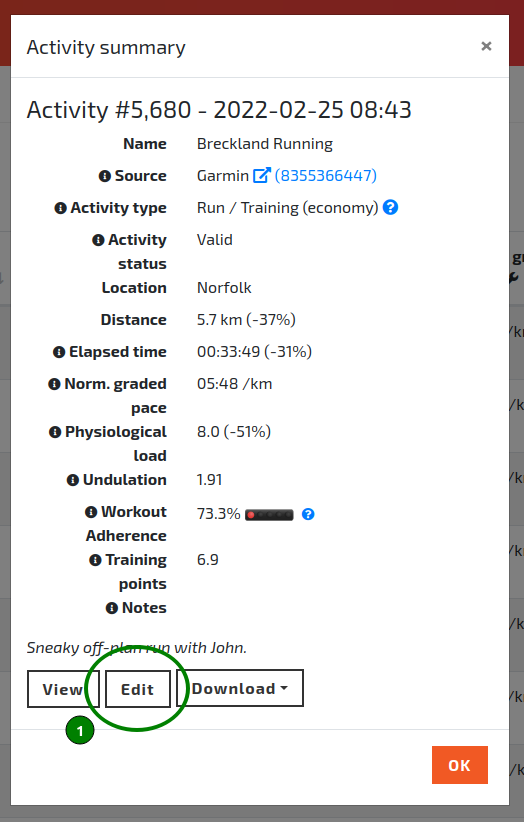
The Activity summary pop-up dialog.
- On the 'Edit Activity' page, scroll down to the 'Constraints' section and set the 'Ignore in weekly run count' toggle to 'Ignore', then click 'Save'.
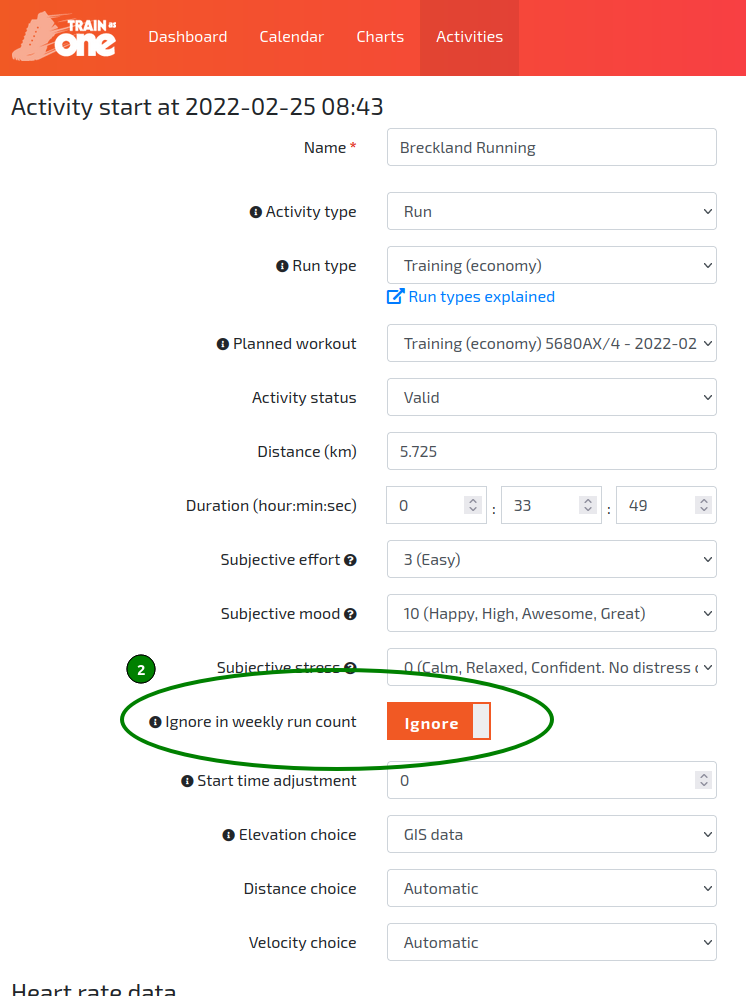
The 'Ignore in weekly run count' toggle set to 'Ignore'.
Note: Enabling this setting does not mean the AI ignores the physical exertion of your run. The physiological load and fatigue generated by your off-plan run are still fully considered by the system when dynamically generating your revised training plan. This simply stops the run from consuming one of your allocated weekly training days.