
How do I tell TrainAsONE that I cannot run on a specific day?
By Dr. Sean Radford
•
17th February 2022
(Updated 12th October 2026)
There are two ways to tell TrainAsONE that you cannot run on a particular day.
Quickest: mark a single day as a no-run day
- Open your Training Calendar (or the Next Workout card on your Dashboard).
- Next to the date, click the I cannot run on this day icon (filled blue circle with an X).
- Confirm when prompted: “Make {day} a no-run day?”
The day immediately becomes a rest day. This does not rebuild your whole plan — it simply removes the run from that date and leaves the rest of your plan alone. It works even on a day inside a rolling lock.
See How do I skip a run on a specific day without changing my weekly schedule? and What is the difference between locking a day and skipping a run?.
Via Training Day Rules
You can also set a day's Training Day Rules to mark it as a no-run day — useful when you want to change other constraints at the same time.
- Go to your web Calendar and click on the title of the day that you cannot run. (Exampled as March 9th in the image below.)
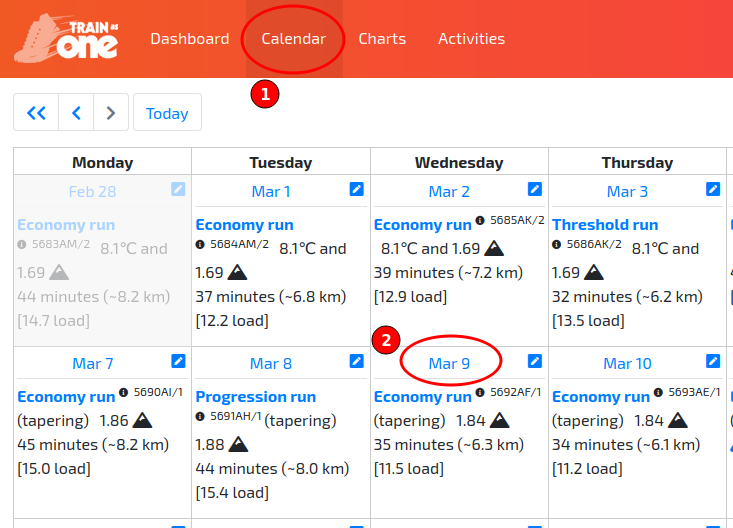
Accessing the Training Day Rule for Mar 9th.
- On the resulting ‘Training Day Rules’ pop-up dialog, simply set the ‘Schedule workouts’ field to ‘No’ and then click ‘Save’.
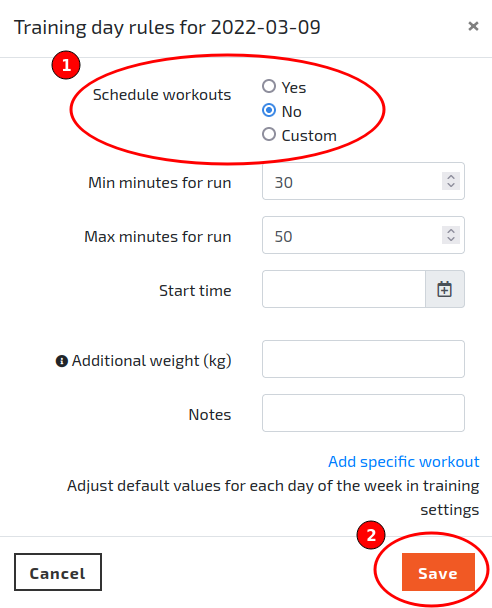
The Training Day Rules dialog illustrating how to specify that you cannot run on a specific day.
- Wait a short while and your plan will have been re-built adhering to this new constraint.
On the Roadmap
The ability to mark out a range of days that you cannot run, e.g. while on vacation, is on the roadmap. In the meantime, you can [lock a range of days](/faqs/2026/how-do-i-lock-or-unlock-a-range-of-days-at-once) to keep them exactly as they are.