
How do I upload an activity file (recording)?
By Dr. Sean Radford
•
1st March 2022
(Updated 6th May 2022)
TrainAsONE can accept activity recordings (activity files) in the following formats:
- FIT - Flexible and Interoperable Data Transfer
- GPX - GPS Exchange format
- TCX - Training Center XML
If you have such a file that you wish to upload, you can do so from your Activities list page.
- Go to your Activities list page.
- Press the 'Add Activities' drop-down button.
- Select the 'Upload activity data' menu item.
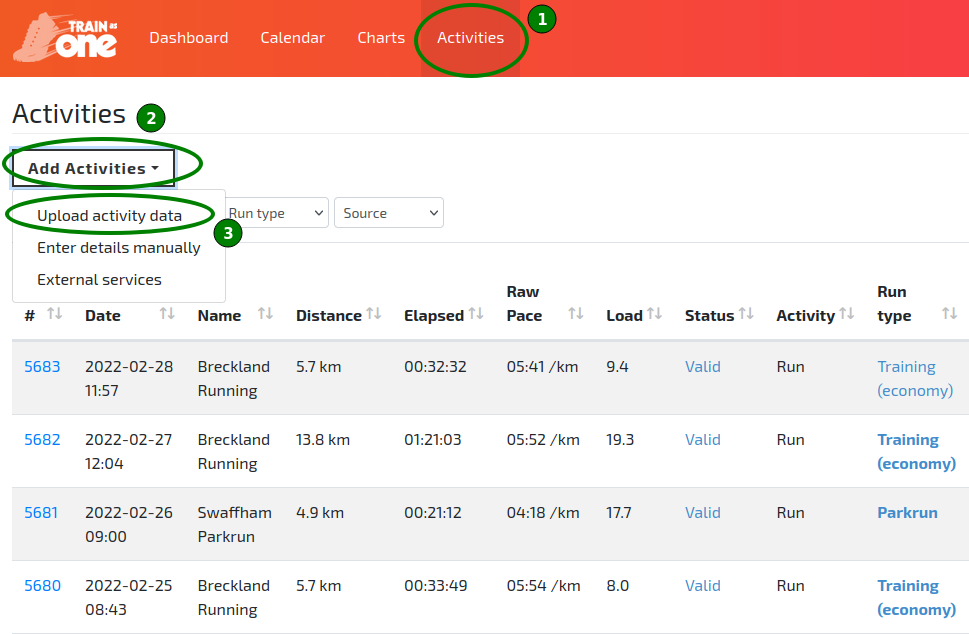
The ‘Upload activity data’ option of the Add Activities menu.
- In the resulting 'Upload activity data' pop-up dialog, click 'Browse' to select your file.
- Click 'Upload'.
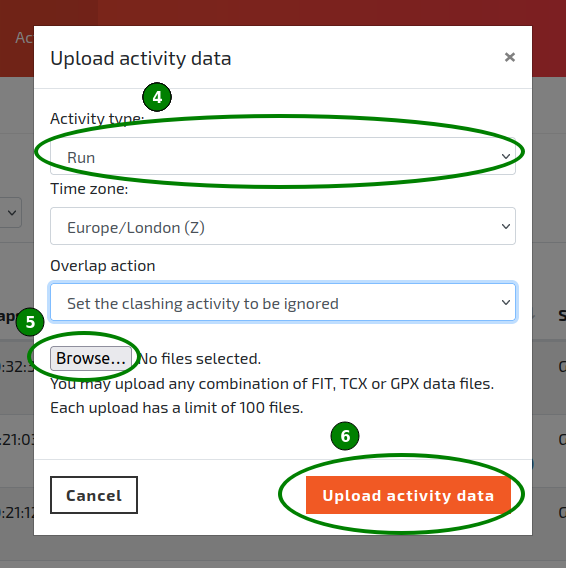
The Upload activity data pop-up dialog.