
Feature Update: Per-Day Locking, Race Days and Post-Race Rest Days

TrainAsONE's whole purpose is to adapt your plan to you — but sometimes you know something the algorithm cannot: that a particular day must not move, or that a date is special. This update hands you precise, day-level control, and gives race days and post-race recovery a place of their own.
Lock any day, exactly where it is
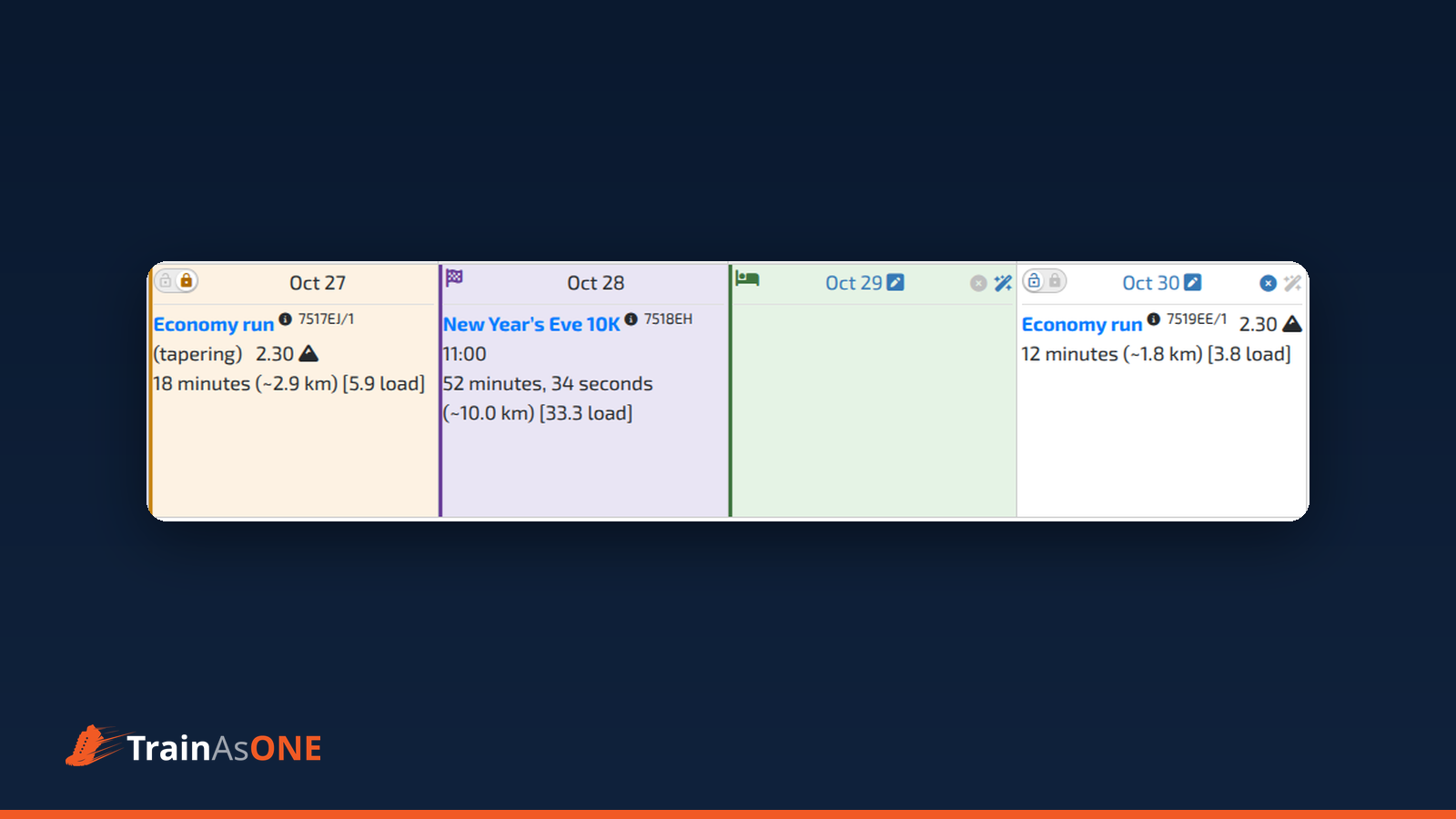
Every day in your Training Calendar now carries a padlock switch: an open padlock (unlocked) on the left, a closed padlock (locked) on the right. Click the closed padlock and the day is held exactly as it is — its workout, or its rest day — the next time your plan updates. A locked day is tinted amber and shows its closed padlock.
The same switch sits in the bottom bar of the Next Workout card on your Dashboard, so you can hold your very next session in a single click.
Locking does not rebuild your plan and changes nothing immediately — it simply takes effect at your next plan update.
Lock a range — or keep "the next few days, always"
Open the padlock button in the Calendar toolbar and choose Lock days. You can lock the next N days, or between two dates, and locking is additive: a second range does not release the first.
Want a window that follows your plan? Choose Create a N day rolling lock, and TrainAsONE keeps the first N days fixed as your plan advances, day by day — ideal through a taper, with nothing to re-lock. Days inside the window show a clock-and-padlock icon; days beyond it remain entirely yours. You can have one rolling lock at a time.
Race days get a look of their own
A race is the most definite statement a day can carry, so a race day is now presented as its own kind of day: a chequered-flag marker next to the date, whose tooltip names your race, and its own cell tint. Even if the race falls inside a rolling lock, it reads as a race day — never as a locked day.
A race day also offers no per-day controls — no padlock, no pencil, no "I cannot run on this day" and no "Let TrainAsONE plan this day". The race owns the day, so to change it you edit or delete the race itself. (A race day that was locked before this change can still be released.)
Post-race rest days, front and centre
The post race rest days you set when entering a race now have a visible place in your calendar. Each rest day carries a small green bed marker and a green tint, with the tooltip "You have defined this day as a rest day following the {race name}".
The number of days follows a single chain: the race's own Post race rest days value wins; if that is left blank, your Post race rest days default in Training Settings applies; an explicit 0 means no rest days. These days are a default, not a lock — they never freeze the day. Use "Let TrainAsONE plan this day" on a rest day to return to training early, and mark further days as no-run days to rest longer. A post-race rest day also wins over a rolling lock.
“Your explicit, day-by-day decision always takes precedence over the automatic rolling lock.
”
A cleaner, clearer set of controls
Alongside the padlock, "I cannot run on this day" and "Let TrainAsONE plan this day" remain for ordinary days — each a quick, local change, covered in their own article: Skip a Run, or Let the AI Plan the Day. But they step aside where they would be meaningless: on a race day, and on a day whose run is already behind you (counted and analysed), there is nothing left to freeze or skip, so the per-day controls are not shown.
Find out more
Every feature here has a step-by-step FAQ:
- How do I lock a day in my training plan?
- How do I lock or unlock a range of days at once?
- What is a rolling lock and how do I release it?
- How is a race day shown in my training plan?
- What is a post-race rest day and how do I change it?