
Feature Update: Plan Suspension, Training Pauses and Stated Injury Constraints

Two questions reach our support desk more than any other: "why is my calendar empty?" and "why are there no speed sessions in my plan?" Both had an answer — but the answer lived in a note you had to find, or in nothing at all. This update gives each state a face of its own, and tells you plainly what is going on and what to do about it.
A plan nobody is following is not a plan
TrainAsONE adapts to what you tell it: how the session felt, whether you did it, how you are recovering. That feedback has to come from you. If you stop using TrainAsONE altogether, we were still rebuilding your plan every week — for a plan nobody was reading.
So plan building is now suspended automatically when TrainAsONE has not been used for three weeks (website or mobile app). Only your use of TrainAsONE counts, not the activities arriving from your watch: a Garmin, Strava or Suunto connection will happily keep uploading runs for months without you ever opening your plan, and that tells us nothing about whether the plan still fits.
You are not cut off without warning. Two emails come first — one ten days before, and a final one 48 hours before — each stating the time you actually have left and carrying a Log in now button. Logging in clears both warnings and nothing is suspended.
While a plan is suspended:
- your Calendar shows no workouts;
- no upcoming workout emails are sent;
- nothing new is built until you resume.
What it does not do is touch your account. Your subscription is unaffected, every activity you have recorded stays exactly where it is, and Resume training builds a fresh plan from your current fitness immediately.
A pause you chose now looks like one
Say you set a pause until the middle of May: a holiday, then a niggle to get on top of, then back to it. The plan stops — correctly — but until now the calendar simply emptied, and the only trace of the reason was a line in the notes.
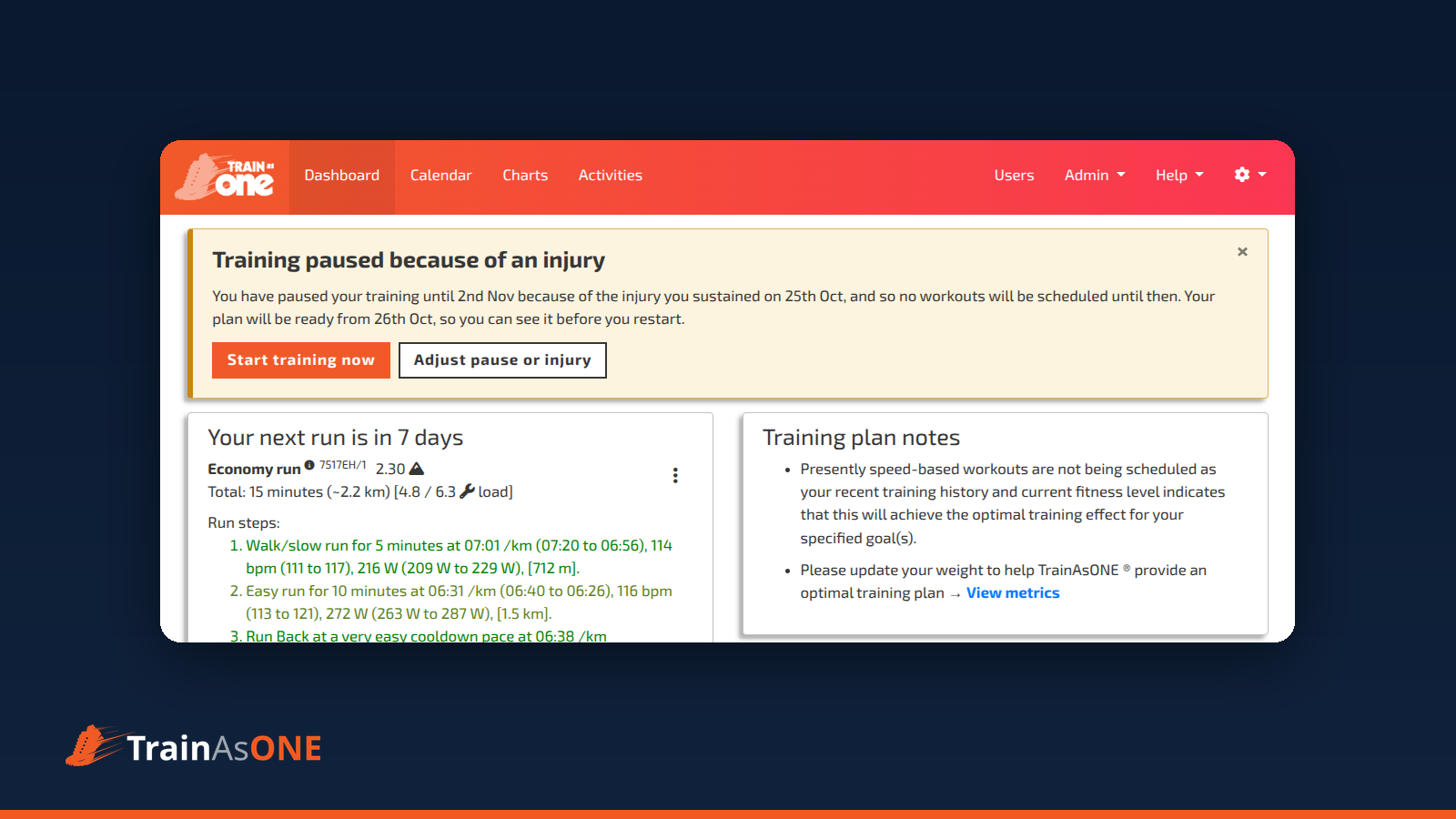
A pause now has its own banner at the top of the Dashboard and Calendar, and it answers the second question as well as the first:
"You have paused your training until 15th May, and so no workouts will be scheduled until then. Your plan will be ready from 8th May, so you can see it before you restart."
That last sentence is new, and it is the point of the change. The plan for your return is now built in the week before your start date, so you can see what you are coming back to instead of finding an empty calendar the day you restart. Days inside the pause are marked as rest days on the calendar, with the date you start training again in the tooltip, and — having no run to act on — they carry no padlock, no pencil and no quick actions.
Two consequences are worth knowing:
- Setting or changing a pause clears what came before it. Day locks and per-day rules dated before your start date are deleted: those days are rest days, so a lock there could never have been honoured. A rolling lock is kept, but it does nothing until you restart.
- Restarting early is a decision, not a slip. Start training now rebuilds from today, and asks you to confirm first, because it discards the plan already built for your pause date and does not restore the locks and rules from before the pause.
A race that falls inside a pause is rested through: you keep the race, and the pause carries on past it. Set a pause that runs beyond your next race and you will be asked to confirm — usually that is a mistake, and moving the start date earlier is what you actually meant.
Notices that need a decision now interrupt you
Most of what TrainAsONE tells you is information: an out-of-date weight, a race still months away. That belongs in the Training plan notes, and it stays there.
A notice that needs a decision is different, and it is now shown as a banner above the page — a headline, an explanation, and the action that resolves it. A suspended plan offers Resume training; a pause offers Start training now and Adjust start date. Only one banner is shown at a time, so two problems never compete for the same space.
You can dismiss a banner with the ×, but only as far as the situation allows: a suspended plan raises it again after two weeks if it is still suspended, while a pause you dismissed comes back only if you change the pause date. Dismissing affects the website only — the emails that carry the same notice are unchanged.
Your injury now says what it is binding
The other question — "why is every run capped at 40 minutes?" — had the same cause: an injury on record, shaping the plan silently.
Recording an injury or illness does two independent things. It can pause your training until a date you choose, and — whether you pause or not — it constrains what the plan may ask of you:
- no speed sessions, unless Allow speed sessions is left ticked;
- no fast assessments, unless Allow fast assessments is left ticked;
- runs capped at N minutes, when you set a Maximum run minutes;
- a pace adjustment, slowing every prescribed pace by a fixed amount per kilometre (or replacing it with a walking pace).
Those bindings are now stated where they bite, always naming what is actually binding:
- on the Dashboard, as one informational line inside the Next Workout card — "Your recorded injury is limiting your plan: No speed sessions, Runs capped at 24 minutes" — with a link to adjust it;
- in the Calendar header, as a box with the same list, whenever there is no next-workout card to put it in (which is the case while your plan is paused);
- in run emails, alongside the plan notices.
The line steps back while a banner already names the injury — because the plan is paused because of that injury — so you are not told the same thing three times on one page. Unlike a note, it cannot be dismissed: the binding holds until you clear the injury.
“Amber means act, blue means state: a banner asks something of you, a constraint line simply tells you how things stand.
”
One place to pause or record an injury
The pause and injury form is now one control, in the Calendar header (and on Training Settings), labelled by the state of your plan:
- Pause training/injured? when neither is recorded,
- Adjust training pause while your plan is paused,
- Injury recorded - adjust when an injury is on record without a pause.
One control rather than two, because a plan paused because of an injury is a single state, not two. Clear injury/illness on that form removes both the injury and any pause date.
Find out more
Each of these states has a FAQ of its own:
- Why has my plan build been suspended?
- What is the banner at the top of my Dashboard or Calendar?
- How do I pause my training plan?
- What does a recorded injury change in my plan?
- How should I use TrainAsONE when returning from an injury?
- Do my locked days survive a plan update?